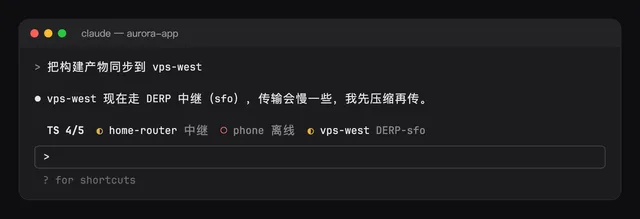
ts-band
ts-band · by hoobnn
Shows Tailscale nodes' state in a band above the prompt, with a toast when a node comes up or goes down.
❯ /plugin marketplace add SeongGwangJu/k-mods
❯ /plugin install ts-band@k-mods
$ claude plugin marketplace add SeongGwangJu/k-mods
$ claude plugin install ts-band@k-mods
Run /reload-plugins to apply it to an open session. Needs Claude Code 2.1.287 or later.
Notes
- Tailscale must be installed for it to work (if it is not, it quietly shows only a 'not found' error).
- The default refresh interval is 60 seconds (minimum 10 seconds), and if lookups keep failing, it retries more and more slowly, up to 10 minutes.
- If you leave
tailscalePathempty, it finds the CLI automatically in this order: PATH, the Homebrew install path, the CLI bundled in the macOS app.
Requires
- tailscale CLI
What it can do on your machine
Mods run unsandboxed with your permissions. These labels come from static analysis.
Runs programsCan hold/answer tool callsReads conversationReads env/settings
Static analysis
Events handled
Environment variables read

